Landscape Brochure 3D Mockup: A Professional Tool for Realistic Brand Presentations
In the competitive world of marketing and corporate branding, visual presentation matters more than ever. Whether you're designing a company profile, product catalog, or promotional print material, the way your brochure looks in a real-world setting can make or break a client’s impression. This is where the Landscape Brochure 3D Mockup comes in — a powerful tool that allows designers and marketers to showcase their work in a realistic, engaging format.
Understanding the Landscape Brochure 3D Mockup
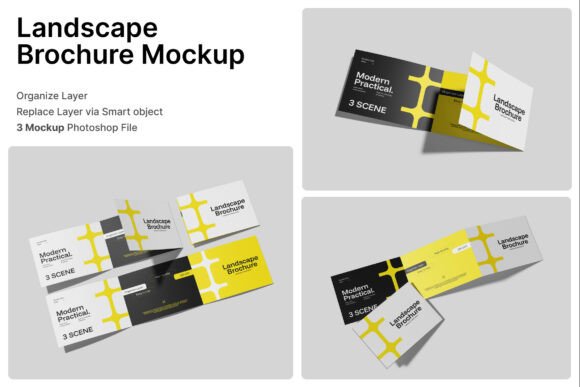
The Landscape Brochure 3D Mockup is a digital design tool that enables users to visualize folded brochures in a horizontal layout. It includes three high-resolution PSD files, each offering a different perspective — perfect for demonstrating how a brochure will appear in print and promotional settings. Designed with smart object layers, this mockup simplifies the process of inserting your artwork, allowing you to double-click a layer, place your design, and save for instant presentation-ready visuals.
With a resolution of 4000 x 3000 pixels and a 300 dpi output, the mockup ensures that every detail is crisp and clear, making it ideal for both digital and print use. It’s especially valuable for businesses and agencies looking to impress clients with professional-grade previews of their printed materials.
Challenges in Brochure Presentation
Many designers and business owners struggle with presenting their brochure designs in a way that truly reflects their quality and intent. Flat, two-dimensional previews often fail to convey the texture, fold, and overall impact of a printed brochure. This can lead to miscommunication with clients or stakeholders who expect a more tangible sense of the final product.
Additionally, when pitching branding materials or marketing collateral, the ability to show how a brochure fits into a broader visual identity — such as alongside packaging, advertisements, or other print materials — is crucial. Without the right tools, this can be difficult to achieve without costly physical samples.
How Landscape Brochure 3D Mockup Addresses These Challenges
By using the Landscape Brochure 3D Mockup, designers can overcome these presentation hurdles with ease. The mockup provides a lifelike preview that includes realistic paper textures, folding styles, and environmental context. This helps clients and team members visualize the final product more accurately, reducing the need for physical proofs and speeding up the approval process.
Moreover, the horizontal format is ideal for a wide range of applications — from travel catalogs and restaurant menus to advertising materials and editorial marketing campaigns. The mockup’s versatility makes it a go-to solution for creative professionals across industries.
Practical Applications Across Industries
- Marketing Agencies: Agencies can use the mockup to present campaign materials in a visually compelling way, helping clients understand how brochures will integrate into their overall marketing strategy.
- Travel Companies: Travel catalogs often rely on visual appeal to attract customers. The 3D mockup allows designers to showcase destinations and itineraries in a realistic brochure format.
- Restaurants and Cafés: Menus and promotional flyers can be previewed with the texture and layout of real printed materials, helping owners make informed design decisions.
- Publishing Brands: Editorial teams can visualize how company profiles or product guides will look in print, ensuring alignment with brand standards before production.
Getting the Most Out of the Mockup
For best results, users should approach the Landscape Brochure 3D Mockup as part of a broader design workflow. Here are a few tips to maximize its value:
- Start with a clear layout: Ensure your brochure design is well-structured before inserting it into the mockup. This includes proper bleed areas, margins, and color profiles.
- Use high-quality images: Since the mockup does not include stock images, sourcing professional photography or graphics will enhance the realism of your presentation.
- Customize the background: The mockup offers flexibility in background choice. Select a setting that aligns with your brand or the intended use of the brochure — whether it's an office, a travel destination, or a retail environment.
- Experiment with different views: The three included PSD files offer various angles. Use them to show different aspects of the brochure, such as the front cover, open layout, and folded perspective.
Different Users, Different Approaches
While the Landscape Brochure 3D Mockup is a versatile tool, how users approach it can vary based on their goals and experience levels. For instance:
- Beginners: May benefit most from the included PDF help guide, which walks through the steps of inserting designs and adjusting layers. Starting with simple presentations can help build confidence.
- Experienced Designers: Might use the mockup to create more complex visual narratives, combining it with other assets to build full campaign mockups or digital portfolios.
- Business Owners: May collaborate with designers to ensure their branding materials are presented professionally, using the mockup as a communication tool with print vendors or marketing teams.
Final Thoughts: A Must-Have for Professional Designers and Marketers
In today’s design-driven market, the ability to present printed materials in a realistic and engaging way is essential. The Landscape Brochure 3D Mockup offers a simple yet powerful solution for showcasing brochures, catalogs, and promotional materials with clarity and professionalism.
Whether you're pitching to a client, building a portfolio, or preparing for print production, this mockup helps bridge the gap between digital design and physical outcome. Its smart object layers, high resolution, and flexible layout options make it a valuable asset for any creative or business professional looking to elevate their presentation game.
By incorporating the Landscape Brochure 3D Mockup into your workflow, you not only streamline the design process but also enhance client communication and confidence — ultimately leading to better results and more successful marketing campaigns.