Rectangle Sign Board 3D Mockup for Modern Design Projects
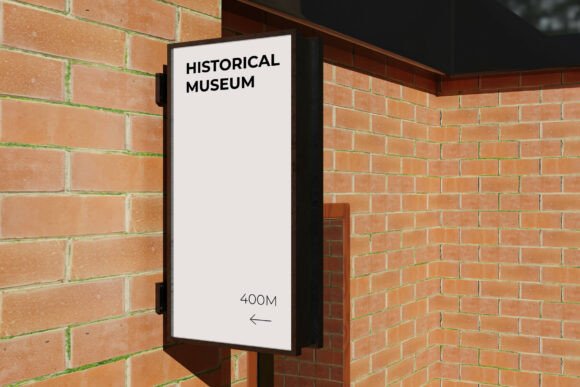
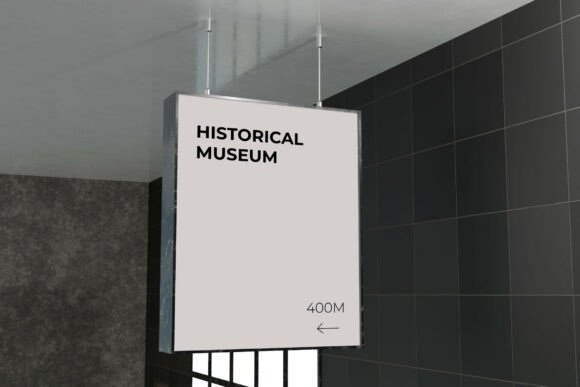
For designers and creators working on signage presentations, the Rectangle Sign Board 3D Mockup offers a clean, realistic way to visualize concepts in a professional setting. This mockup features a suspended rectangular sign rendered in a minimal architectural environment with soft natural lighting and detailed shadows, making it ideal for a variety of applications including wayfinding systems, museum exhibits, office branding, and retail signage.
What Is the Rectangle Sign Board 3D Mockup?
This mockup is a high-quality 3D representation of a rectangular sign board, designed to help users showcase their graphic designs in a lifelike context. It includes a single PSD file with smart object layers, allowing for easy customization. Simply double-click the designated layer, insert your design, and save — no advanced 3D modeling skills required.
Rendered at 4000 x 3000 pixels and 300 dpi, the file offers high resolution suitable for print and digital presentations. A PDF help guide is included to walk users through the setup and editing process. It’s a versatile tool for professionals and beginners alike who want to present signage ideas with a clean, modern aesthetic.
Why Designers and Brands Choose This Mockup
The Rectangle Sign Board 3D Mockup stands out for its clean, minimalist presentation. Unlike overly stylized mockups, this one focuses on realism and adaptability, making it perfect for clients who want to see how their signage will look in a real-world architectural environment.
- Graphic designers use it to show clients how typography, color, and layout will appear on a suspended sign.
- Interior designers incorporate it into project proposals to illustrate how signage integrates with space and lighting.
- Brand identity professionals rely on it to demonstrate how brand elements translate into physical environments.
How Different Users Benefit from This Mockup
Depending on your experience level and project goals, the value of this mockup may vary. Here’s how different types of users can benefit from it:
Beginners and Learners
If you're new to design or 3D visualization, this mockup offers a straightforward way to present your ideas professionally. The smart object layers simplify the editing process, letting you focus on your design rather than complex 3D tools. It’s a great learning aid for understanding how design elements translate into real-world applications like office signage or directional systems.
Experienced Designers
For seasoned professionals, the Rectangle Sign Board 3D Mockup serves as a time-saving tool. Instead of building a 3D model from scratch, you can quickly insert your designs and deliver polished visuals to clients. The high-resolution output ensures your presentations maintain quality, whether you're sharing digitally or printing for in-person meetings.
Business Owners and Marketers
Small business owners or marketing teams can use this mockup to visualize branding elements before production. Whether planning a new store layout or rebranding office spaces, seeing how a sign will look in context helps make informed design decisions without costly physical prototypes.
Educators and Students
In educational settings, this mockup can be used to teach students about spatial design, typography in the built environment, and digital presentation techniques. It helps bridge the gap between concept and reality, offering a practical example of how graphic design functions in three-dimensional space.
Key Features and Practical Uses
Several features make this mockup stand out in both usability and visual impact:
- Smart object layers allow for seamless design integration without altering the 3D structure.
- High-resolution output ensures clarity for print and digital use.
- Clean architectural setting keeps the focus on your design without unnecessary distractions.
- Soft natural lighting adds realism and helps showcase how signs appear under typical indoor lighting conditions.
Some practical applications include:
- Presenting directional signage for museums or corporate offices
- Visualizing retail store branding elements like hanging signs
- Demonstrating wayfinding systems for architects and interior designers
- Creating portfolio samples that show spatial awareness and environmental integration
Considerations for Different Users
When deciding if the Rectangle Sign Board 3D Mockup is right for your needs, consider your priorities:
- Beginners may care most about ease of use and learning value — this mockup is simple to edit and teaches real-world presentation skills.
- Professionals might prioritize quality and flexibility — this file delivers both with its high resolution and adaptable design.
- Entrepreneurs and business owners may be focused on cost-effectiveness and presentation quality — this mockup offers a budget-friendly way to visualize signage without hiring a 3D artist.
- Educators could value its instructional use and visual clarity — it’s ideal for classroom demonstrations or student projects.
Real-World Examples
Here are a few ways different users might apply this mockup in practice:
- A freelance graphic designer could use it to show a client how a new logo would look on a suspended office sign.
- An interior design firm might include it in a proposal to visualize wayfinding elements in a new commercial space.
- A small business owner could use it to test different color schemes before ordering physical signage for a new store.
- A design student might incorporate it into a portfolio to demonstrate how their work functions in a real-world environment.
Final Thoughts
The Rectangle Sign Board 3D Mockup is more than just a presentation tool — it's a bridge between concept and reality. Whether you're a seasoned designer, a small business owner, or a student learning the ropes, this mockup offers a clean, realistic way to visualize signage in context. With its smart object layers, high resolution, and minimalistic setting, it provides a flexible and practical solution for a wide range of design and branding needs.